Navigating the technical complexity of two incompatible architectures: how we transformed a weeks-long, engineering-intensive migration process into a self-serve experience that customers love.
Over the last two years, we’ve migrated over 1.3 million subscriptions from Paddle Classic to Paddle Billing.
This journey started as a fully manual process, requiring daily calls between customers and our engineering teams. We quickly realized that this was not scalable or ideal for our customers, and transformed it into a self-serve experience where customers can migrate thousands of subscriptions without any intervention from our team.
It involved solving fundamental data mapping challenges between two incompatible architectures, building a multi-layered validation system to handle edge cases, and orchestrating imports across distributed microservices.
But beyond the technical challenge, we had to solve the human challenge: what motivates our customers, how they actually work, and what gives them confidence. We needed to translate the daunting task of migrating their data into an experience that feels intuitive.
”Don’t replatform:” how migrations became critical
Common convention in tech is “don’t replatform.” Replatforming is not a panacea. Yes, you’ll get a chance to start afresh and rebuild your product the “right way,” but there are always challenges that make it better to rework what you’ve already built.
And yet, in August 2023, we went against conventional wisdom and launched Paddle Billing, a complete overhaul of our platform with a fundamentally different architecture: distributed microservices instead of a monolith, entities built around customer jobs-to-be-done, and a modern API and developer tooling.
The risk paid off. Paddle Billing now powers millions of dollars in daily transactions, and it accelerated new customer growth beyond what we saw on Classic. Its new technical underpinnings mean that we’re able to move much faster. Since launch, we’ve released close to 200 updates exclusive to Billing — including one-page checkout, webhook simulator, saved payment methods, and hosted checkouts.
Now we’re facing the biggest challenge that comes with replatforming: maintaining two complete systems in parallel. We spend time, money, and engineering resource on Paddle Classic that we could be using to build new features for Billing. Meanwhile, we have customers who want to take advantage of Paddle Billing’s rapidly growing feature set but, until recently, had no clear migration path.
This is how migrations became critical. How do we migrate millions of subscriptions between two fundamentally incompatible architectures without losing customer data or trust? And how do we transform that process from something requiring weeks of engineering support into something customers can confidently do themselves?
Phase 1: Paddle-assisted migrations
In 2023, we announced that we were launching the first wave of migrations from Classic to Billing at our Paddle Forward keynote. Backed by a comprehensive set of dev docs, our first wave would be Paddle-assisted, meaning that we’d work with customers to help them migrate.
But we had to solve some fundamental technical challenges first.
The core challenge: data mapping between two worlds
In a sense, porting data between platforms is easy — at a technical level, at least. The biggest hurdle is in the data mapping. Classic and Billing are fundamentally different architectures with totally different data models.
Classic is a monolith that evolved over years, while Billing is a distributed microservices architecture. From a conceptual point of view, we embraced domain-driven design when building Billing, creating entities that map directly to real-world business problems.
We’ve mapped out the full differences between the two platforms in our dev docs, but here’s a flavor for some of the key differences around just one area, product catalog:
| Paddle Classic | Paddle Billing | |
|---|---|---|
| Localized prices | Currency overrides against a plan or product. | Products and prices as separate, related entities. Country specific prices against prices. |
| Tax mode | Set against a subscription. | Set against prices. |
| Discounts | Coupons for some kinds of discount, modifiers for others. | A single unified discount entity. |
| Currencies | Synthetic currencies where customers pay in one currency but users see another. | Full support for all currencies. |
Building a scalable import service
Once we understood the mapping challenges, we built an import service designed to handle volume imports to Paddle Billing. The service is designed to handle imports from any source, giving us the flexibility of processing imports from other solutions as well as Paddle Classic.
flowchart
    subgraph Sources["Data sources"]
    direction TB
        CSV[CSV or JSON upload]
        PC[Paddle Classic]
        Other[Other platforms]
    end

    subgraph ImportService["Import service"]
        direction TB
        Upload[Upload and validate]
        Store[(Generate and store Paddle IDs)]
        Process[Process and import]

        Upload --> Store
        Store --> Process
    end

    subgraph Billing["Paddle Billing services"]
        direction TB
        CS[Customer Service]
        CatS[Catalogue Service]
        SS[Subscription Service]
        More[+ 5 more services]
    end

    Sources --> ImportService
    ImportService -->|Validated entities<br/>with Paddle IDs| Billing

    style ImportService fill:#fff3e0,stroke:#ff9800
    style Billing fill:#e1f5fe,stroke:#2196f3
It works in three phases:
- Validate data
Before importing, we check the data integrity and flag any issues. - Process data
We process the data, including creating Paddle IDs for each entity. - Create entities
We call services to create the entities in Paddle Billing.
This three-phase approach was crucial because we learned that most issues with imports come from edge cases we hadn’t encountered before in Classic, which could lead to cascading errors.
Issues are usually because we’ve not come across a quirk with Classic. The validation system has evolved to recognize these patterns and either handle them automatically or flag them for manual review.
— Scott Nicol, Engineering manager
The validation phase does more than just check that data is formatted correctly. It has multiple levels, designed to catch any specific quirks and edge cases that customers have built into their setups over the years.
flowchart
    Upload[📤 Upload CSV/JSON] --> L1{L1: Schema<br/>validation}

    L1 -->|Fail| Reject1[❌ 400 error]
    L1 -->|Pass| L2{L2: Data<br/>validation}

    L2 -->|Fail| Reject2[❌ 400 error]
    L2 -->|Pass| L3[L3: Business<br/>logic validation]

    L3 --> Dedup[Deduplication<br/>check]
    Dedup --> Validate[Call service<br/>validation endpoints]

    Validate --> Results{Errors?}
    Results -->|Yes| Failed[❌ Validation failed]
    Results -->|No| Success[✅ Validation successful]

    Success --> Import[Ready to create]
    Failed --> Review[Requires manual review]

    note1[["<b>L1:</b> Matches expected schema?"]]
    note2[["<b>L2:</b> Required fields present?<br/>Valid data types?<br/>Correct formats?"]]
    note3[["<b>L3:</b> 9 sequential calls:<br/>Customer → Address → Business<br/>→ Product → Price → Discount<br/>→ Tax → Subscription"]]

    L1 -.-> note1
    L2 -.-> note2
    Validate -.-> note3

    style L1 fill:#e1f5fe,stroke:#2196f3
    style L2 fill:#e1f5fe,stroke:#2196f3
    style L3 fill:#fff3e0,stroke:#ff9800
    style Validate fill:#fff3e0,stroke:#ff9800
    style Success fill:#e8f5e8,stroke:#4caf50,stroke-width:2px
    style Failed fill:#ffebee,stroke:#f44336,stroke-width:2px
    style Reject1 fill:#ffebee,stroke:#f44336,stroke-width:2px
    style Reject2 fill:#ffebee,stroke:#f44336,stroke-width:2px
To handle the distributed nature of Billing’s microservices architecture, we built a sophisticated idempotency system that includes:
- Deduplication on import side
We dedupe entities at the import service stage by creating them in the database first before passing them downstream. - ID-based idempotency
Because they’ve been created, each entity gets a Paddle ID that serves as an idempotency key, ensuring things are only created once. - Optimistic locking
Rather than using locks on our service, downstream services handle deduplication using the Paddle IDs.
This approach prevents cascading failures and duplicate data issues that can occur when importing thousands of entities across multiple microservices simultaneously.
Orchestration between microservices
As Billing is built around distributed microservices, we felt confident that we could handle high-volume imports. Microservices are designed to scale horizontally and handle distributed workloads more efficiently than monolithic architectures like Classic.
While we regularly load test services to handle high volumes of traffic, like on Black Friday, we knew that imports would create different load patterns than normal platform usage. We worked with our AppEx team to map service-to-service calls and implemented autoscaling on services to guarantee database performance and handle the load.
As an operational safeguard, we also capped imports at 20,000 subscriptions per import to make sure that we could maintain service quality while processing large data volumes.
What we learned from Paddle-assisted migrations
By the time we’d worked through the initial technical hurdles, we’d helped migrate over 1.3 million subscriptions to Paddle Billing. But the process taught us as much about project management as it did about technical architecture.
Resource intensity
Some migrations took 2-3 weeks, with daily calls between our engineering team and our customers’ technical teams. This intensive, hands-on approach meant engineers were meeting directly with customers, which was super valuable for learning, but not scalable across our Classic userbase.
We spent a lot of engineering time supporting individual migrations. This took us away from building the tooling and processes that could enable other teams and customers to perform migrations.
— Scott Nicol, Engineering manager
For the team working on migrations, intricate migration projects that went on for weeks spilled into BAU work, impacting delivery.
We realized we needed to enable customer success managers, technical account managers, and solutions architects to handle more of the process. This in turn would free up engineering resource for building tooling rather than supporting individual migrations.
Workflow mapping is as important as data mapping
While they took up a lot of time, Paddle-assisted migrations were useful because every migration taught us something new about how customers had integrated with Classic.
To counter limitations in Paddle Classic, smart customers had come up with a bunch of workarounds that meant we had to continually evolve our migration tooling.
This is a step beyond the data mapping exercise we did in phase 1 — it’s about how customers understood the data model in Paddle and applied it to their workflows in creative ways.
We documented a bunch of workflows we came up against, but here are some examples:
| Paddle Classic | Paddle Billing | |
|---|---|---|
| Country-specific price localization | Create a price for each country, with logic in the frontend to apply the correct price. | Country-specific pricing supported out-of-the-box against prices. |
| Multi-product subscriptions | Create “template package products” containing details of all items, using pay links to calculate and set a price for all items. | Multi-product subscriptions supported out-of-the-box. |
| Discounted subscriptions | Coupons, modifiers, and pay links discounting subscriptions in multiple ways. | A single discount against subscriptions. |
| Balances | Customer balances added in cases like negative discounts. | Tightly controlled customer balances. |
Testing infrastructure assumptions
The choreography between microservices meant that imports generated lots of service-to-service calls and overhead. We’d planned for this, but our assumptions were put to the test when we started doing real world imports.
Notification service was the biggest bottleneck. It’s responsible for sending events, both service-to-service and customer-facing webhooks. The problem wasn’t necessarily the data volume, but the rapid-fire nature of events during bulk imports.
Customers on the receiving end of webhooks also had difficulty processing the number of them, creating a cascading effect that we hadn’t anticipated as webhooks were automatically queued for retry.
We worked with our developer experience team to route events for imports to a separate queue, processed separately from events for platform traffic. This prevented import load from affecting real-time billing operations while giving us better control over the import event flow.
Phase 2: Foundations for self-serve
Armed with lessons from Paddle-assisted migrations, we kicked off discovery work for a self-serve migration experience. Our product design team led extensive user research to understand what customers truly needed when migrating their data.
Discovery and user testing
Given the nature of the challenge, our research process was more comprehensive than typical product discovery.
We held 18 customer interviews, spanning the full spectrum from one-person startups to large enterprises with dedicated engineering teams. We also conducted internal testing with a group of Paddlers to get different perspectives on the experience.
After this, we brought a bunch of people together across developer experience, support, design, product, and engineering to explore different solutions. By collaborating across departments, we made sure that the final design would be technically feasible, aligned with user needs, and fully supportable.
For design, we created four completely different prototype versions, each testing different approaches to the migration experience. We validated each prototype with six customers to make sure we were moving in the right direction.
To eliminate any blind spots that come from being too close to the product, we ran additional usability tests with non-Paddle customers. The result is a tried-and-tested design that’s grounded in real user feedback rather than internal assumptions.
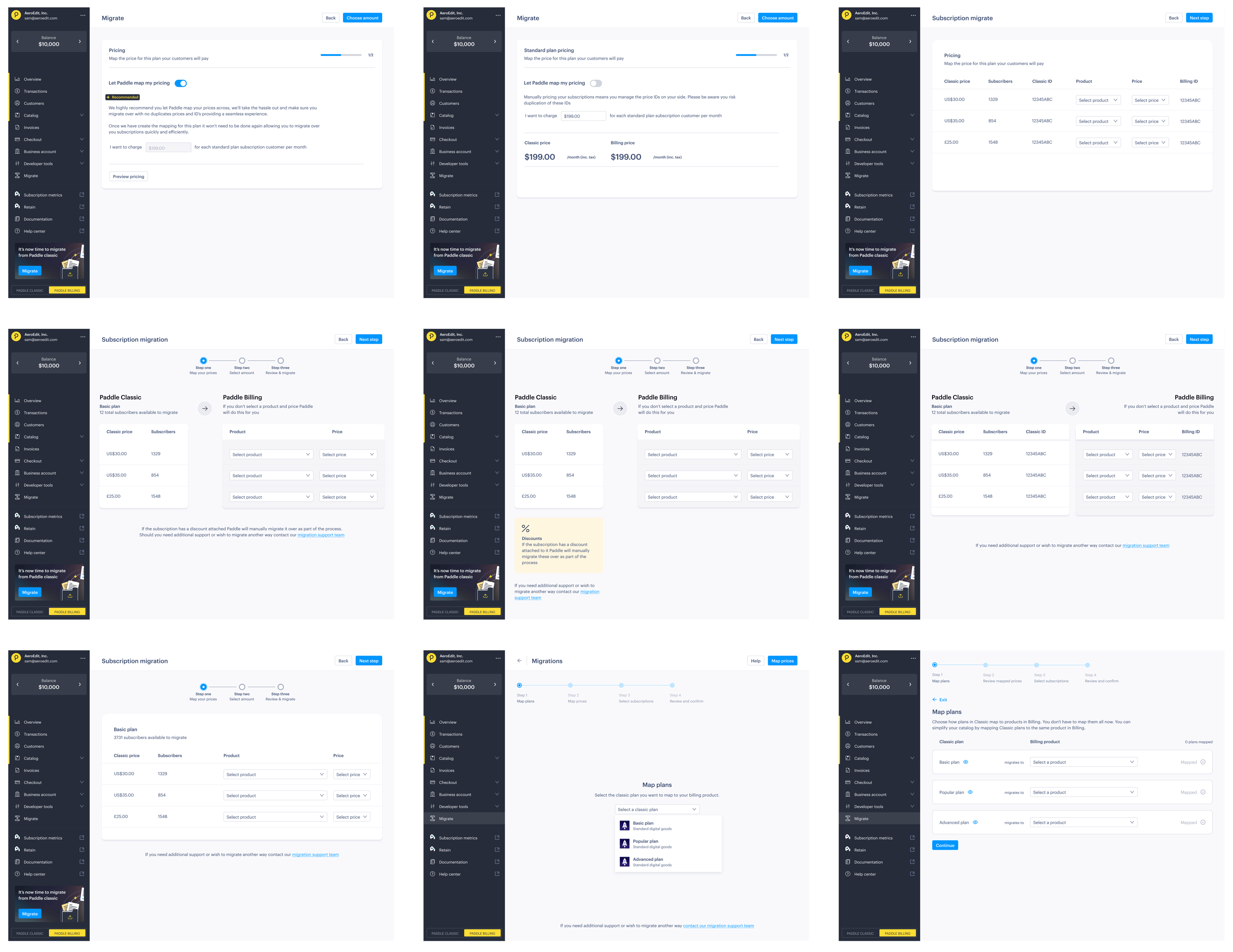
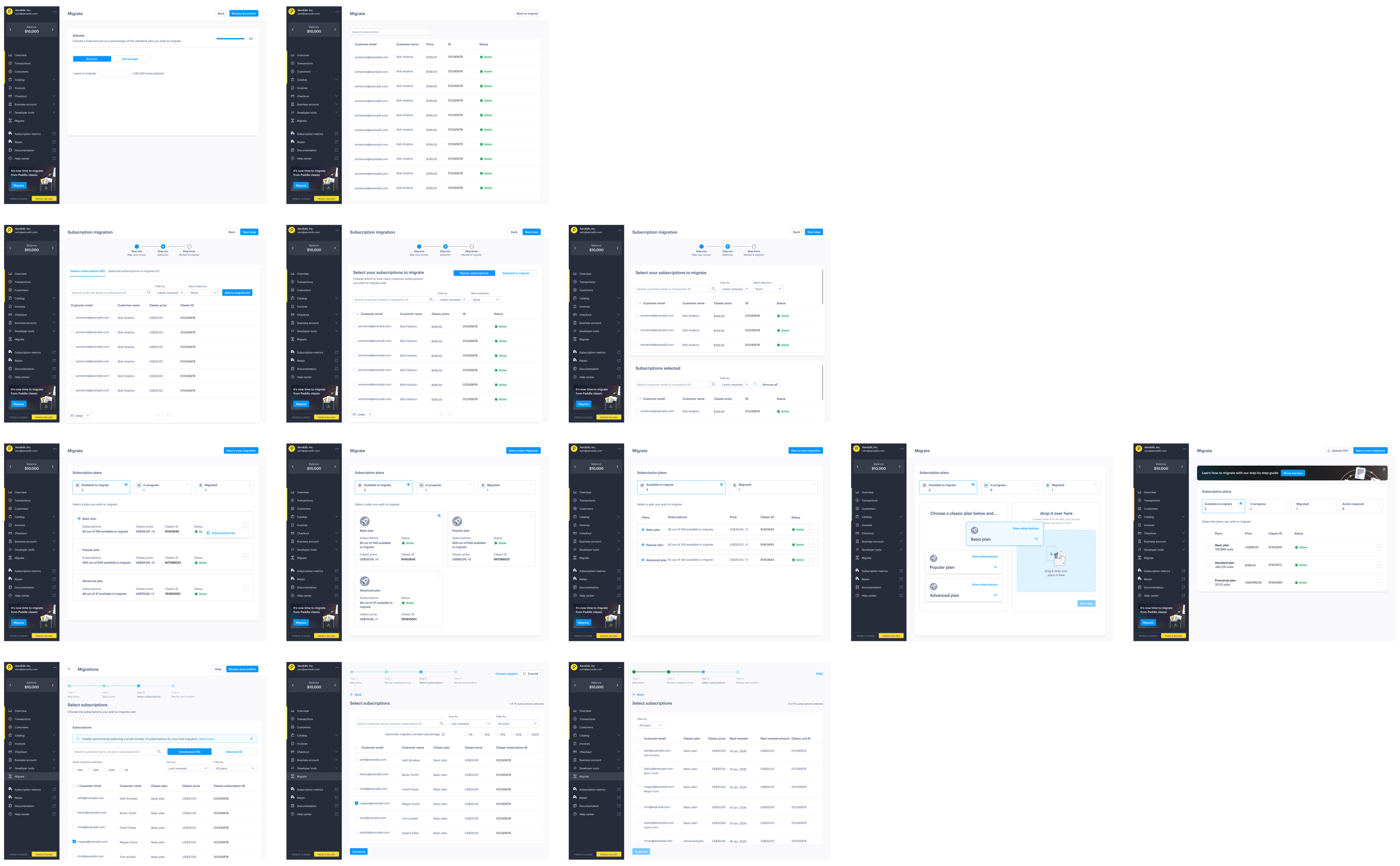
Customer insights
The research revealed some fundamental truths about how customers approach migrations:
- “Don’t lose my money, don’t lose my users”
Retaining revenue and customers was the overwhelming concern. Everything else was secondary to ensuring business continuity. - Size matters
One-person startups were happy to handle migrations themselves, while bigger companies wanted to hand the project over to their engineering teams and expected dedicated support. - Control over convenience
Initially, we designed screens to let customers preselect users to migrate, but customers wanted control. Now, we present a list of users rather than making the selection for them. - Sandbox limitations
With separate sandbox and live accounts, customers wanted to understand exactly what happened in their live accounts on production data.
Mayday, a company whose mission is to automate accurate accounting, were one of the first to use our self-serve migration workflow to move from Paddle Classic to Paddle Billing.
About half of our revenue was on Classic at the time. And I don’t want to have to suddenly firefight. Like we can’t lose customers’ credit card details or accidentally cancel their subscriptions. I wanted to make sure I was confident in how it worked.
— James Scott-Griffin, Co-Founder & CPTO, Mayday
Migrations are emotional
We knew that customers were keen to have a way of migrating data themselves, finding the Paddle-assisted migration process cumbersome. An unexpected finding was how much customers valued visible support options, even if they didn’t use them.
Our research showed that migrations aren’t just technical, they’re emotional. Customers needed confidence that help was available, along with comprehensive documentation that went beyond just technical data mapping and drilled into their specific business workflows.
The documentation was good so we were able to set up the additional webhooks that we needed on our side and make sure all of that was working. It was a little bit of development work and then we were able to get everyone across in the process of a couple weeks.
— James Scott-Griffin, Co-Founder & CPTO, Mayday
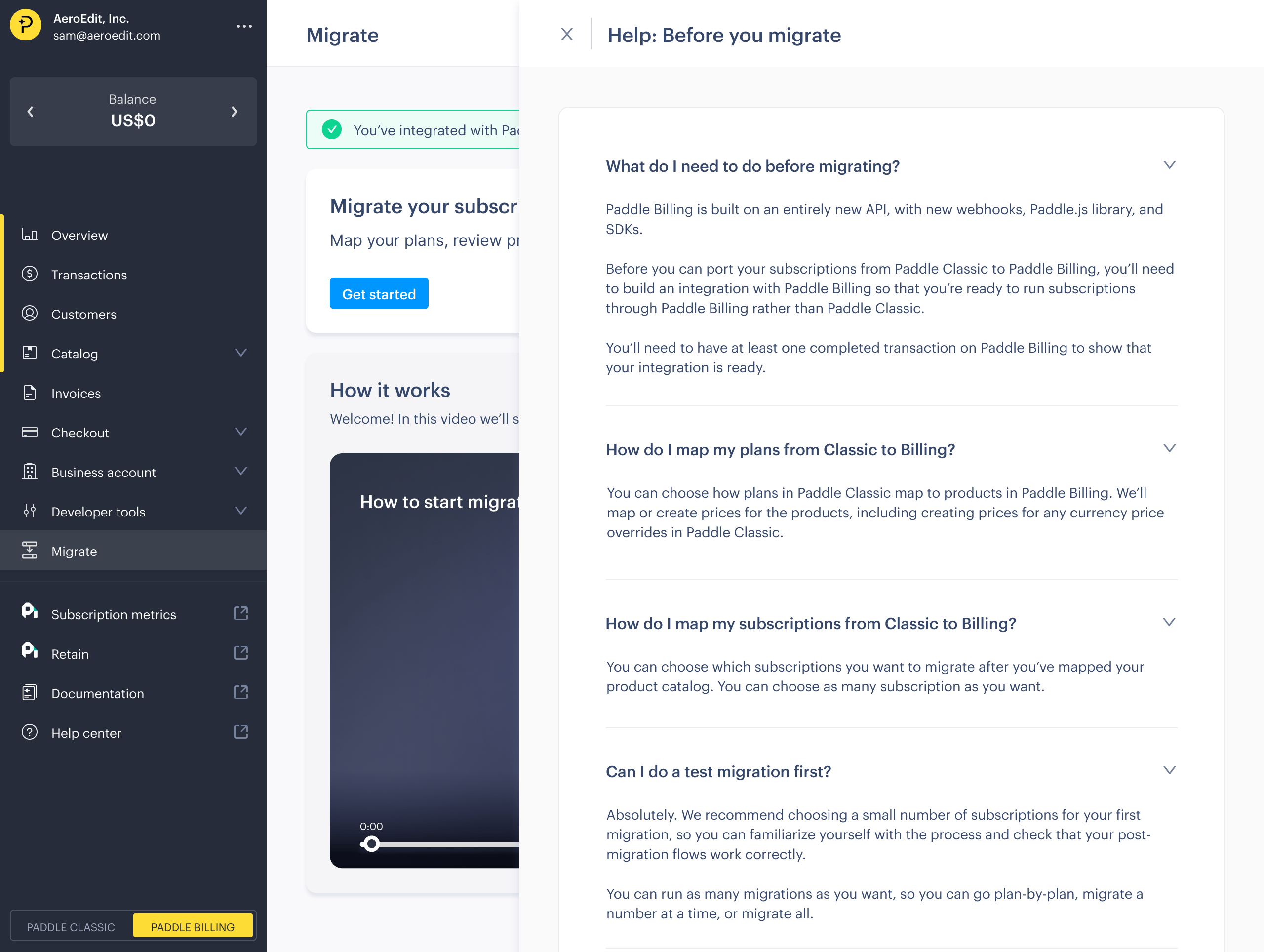
This led to our first experiment with bringing help content directly into the dashboard, including videos and comprehensive FAQs integrated into the migration flow.
The backend: a new migration service
The move from assisted to self-serve migrations required building an entirely new service layer while preserving the reliability of our existing import infrastructure.
A new abstraction layer
The import service we built is complex, designed to handle imports from any platform with sophisticated validation and idempotency systems. Rather than rebuild or configure it, we built a new migration service to sit alongside it for self-serve migrations.
Our research from Paddle-assisted migrations showed that integrations with Paddle Classic were often different from other platforms, with workflows and data models that are unique to Paddle Classic. Our migration service is designed specifically for Classic, and lets us provide a first-class experience for migration from Classic to Billing.
It acts as an intelligent orchestration layer that translates customer decisions from the UI into the technical operations that import service can process. This approach also provides load isolation, meaning heavy imports don’t affect the migration experience in the dashboard - even when large imports are running.
flowchart
    Classic[Data in Paddle Classic]

    MS["<b>Migration service</b><br/>• Workflow steps<br/>• Product/price mapping<br/>• Data transformation<br/>• Progress tracking"]

    IS["<b>Import service</b><br/>• Data validation<br/>• Entity creation<br/>• Idempotency<br/>• Error tracking"]

    Billing[Data in Paddle Billing]

    Classic -->|User-friendly frontend| MS
    MS -->|Bulk dataset, ready to import| IS
    IS -->|Validated entities| Billing

    style MS fill:#fff3e0,stroke:#ff9800
    style IS fill:#e1f5fe,stroke:#2196f3
Migration service handles:
-
Workflow orchestration
Managing the multi-step wizard process and maintaining state between steps. -
Data mapping logic
Translating Classic concepts to Billing equivalents based on customer selections. -
Progress tracking
Providing real-time feedback to customers during the migration process. -
Error handling
Surfacing import service errors in user-friendly language and notifying customers by email.
State management
Unlike import service, which is designed to be abstract, migration service handles complex, multi-step workflows that could span multiple sessions. We built state management that lets customers:
- Save progress and return later
- Validate individual mapping decisions before committing
- Preview the full migration before executing
To do this, the migration service exposes a completely different API surface than the import service. It accepts incremental decisions from the UI, letting customers build their migration while the service validates each decision.
 %%{init: {'theme':'base', 'themeVariables': { 'primaryColor':'#e1f5fe','primaryTextColor':'#666','primaryBorderColor':'#2196f3','lineColor':'#666','secondaryColor':'#fff3e0','tertiaryColor':'#f9f9f9','actorTextColor':'#666','signalColor':'#666','signalTextColor':'#666','labelBoxBkgColor':'#f9f9f9','labelBoxBorderColor':'#666','labelTextColor':'#666','loopTextColor':'#666','noteBorderColor':'#ff9800','noteBkgColor':'#fff3e0','noteTextColor':'#666','actorBorder':'#666','actorBkg':'#f9f9f9'}}}%%
sequenceDiagram
    actor User
    participant Dashboard
    participant Migration service
    participant Import service
    participant Billing services

    User->>Dashboard: Start migration wizard
    Dashboard->>Migration service: POST /migrations
    Migration service-->>Dashboard: 201 created

    User->>Dashboard: Map products and prices
    Dashboard->>Migration service: POST /mappings
    Migration service-->>Dashboard: 201 created

    User->>Dashboard: Start migration
    Dashboard->>Migration service: PATCH /migrations/{id}

    rect rgb(255, 244, 225)
    Note over Migration service: Fetch & transform data
    Migration service->>Import service: POST /imports
    Migration service->>Import service: POST /imports/{id}/datasets
    Migration service->>Import service: PATCH /imports/{id}<br/>(trigger validation)
    end

    Migration service-->>Dashboard: 202 accepted

    loop Poll for progress
        Dashboard->>Migration service: GET /migrations/{id}
        Migration service->>Import service: GET /imports/{id}
        Import service-->>Migration service: Status and statistics
        Migration service-->>Dashboard: Migration progress
    end

    Import service->>Billing services: Create entities
    Billing services-->>Import service: Success

    Dashboard->>Migration service: GET /migrations/{id}
    Migration service-->>Dashboard: Status: completed
The frontend: an intuitive self-serve migration experience
Migration service gives us the power to build a migration experience on the frontend that feels guided rather than automated. Customers maintain control while the system handles the technical complexity behind the scenes.
A modern wizard
In one of our interviews, a customer asked for “a frontend for a CSV file.” But, as our research showed, migration isn’t just data mapping, but involves workflow mapping and decision making too.
With self-serve migrations, we built a modern user experience that guides customers through the same data mapping decisions our engineers had been making manually, but in a way that feels intuitive rather than technical.
It walks customers through a linear journey that mirrors how they actually think about their business.
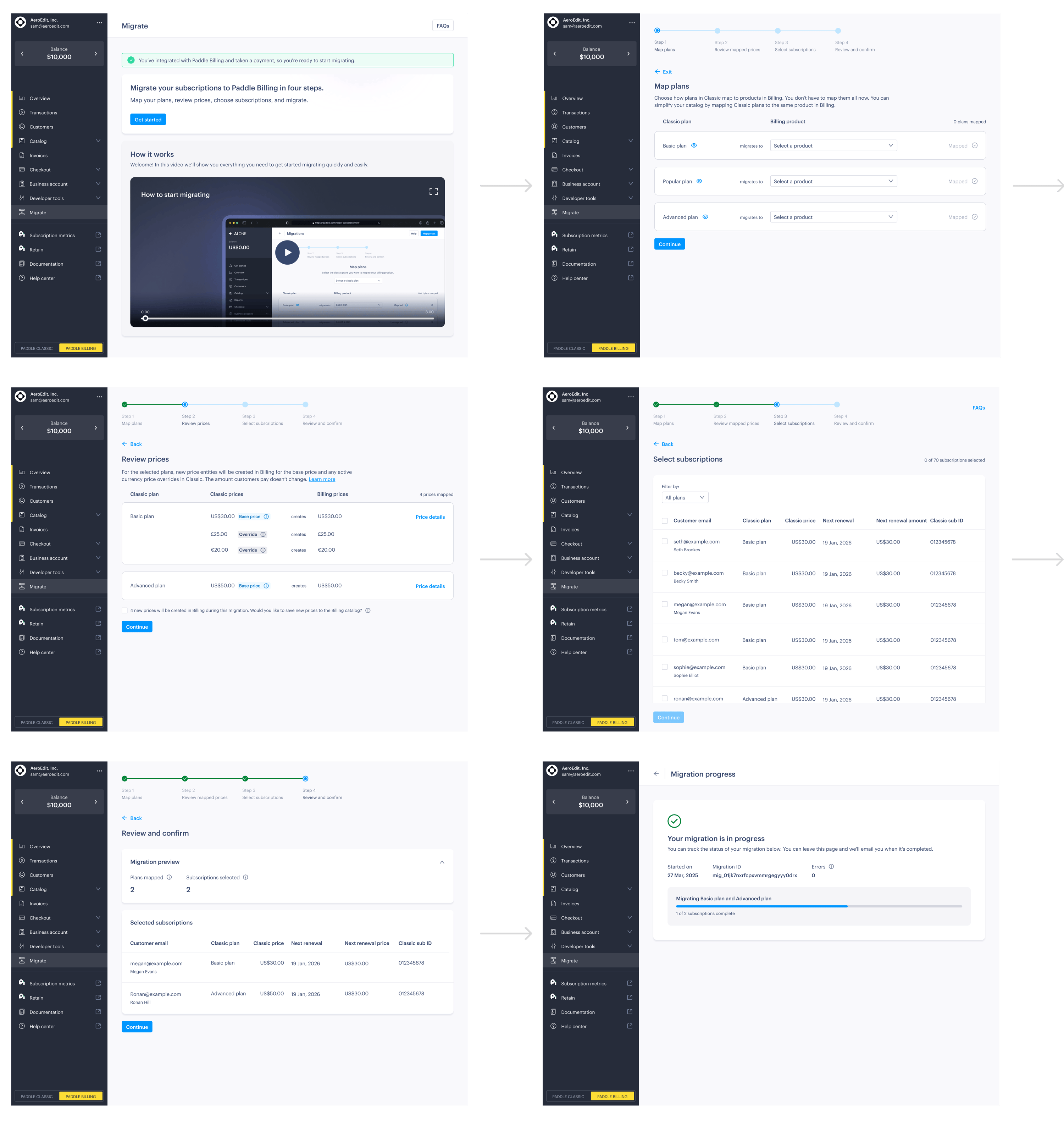
Each stage maps to a clear job-to-be-done:
- First, users learn about what migration means for them and why they should migrate.
- Next, they choose which customers and subscriptions to migrate.
- Then, they run the migration with real-time feedback.
- Finally, they verify that everything was migrated correctly.
Full control, with intelligent defaults
Our assisted migration learnings gave us a deep understanding of common mapping scenarios, so we set intelligent defaults. However, we preserved the ability for customers to override these decisions and gave them full control over the records they want to migrate.
Our aim is to guide, rather than automate, giving users the confidence and control to make the right decisions for their business.
Contextual customer support
For the first time, we brought comprehensive help content directly into the Paddle dashboard. The migration flow includes:
- Video content to help customers understand how migrations work.
- FAQs relevant to the task at hand.
- Support options prominently displayed.
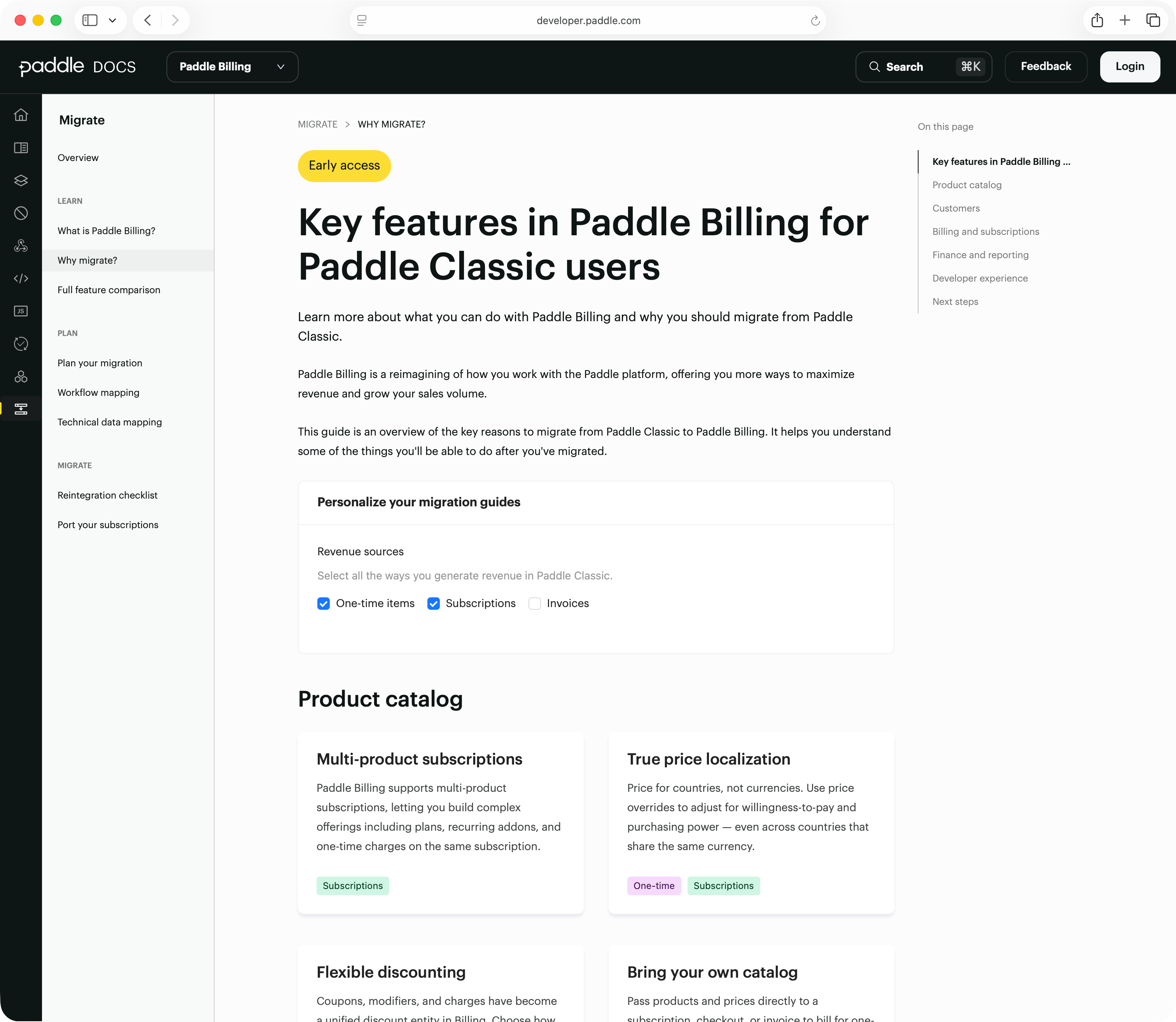
We also massively improved our developer docs based on our learnings, doubling the amount of content and building dynamic guides that are specific to the features customers use and their sales motion.
Key takeaways
Building migrations taught us that technical challenges are often the easier part of the equation. The harder problems are understanding how people actually work, what gives them confidence, and how to translate complex technical processes into experiences that feel intuitive.
Here’s a recap of five key lessons we learned:
- Migrations are fundamentally emotional
While engineers might think of migrations as a technical challenge, for customers it’s their livelihood. This is how they make money and how they interact with their hard-won customers. - Start with manual processes
Paddle-assisted migrations were invaluable for understanding real-world edge cases before building automated solutions. We’ve done migrations with our customers, so we’ve felt the pain firsthand. - Invest in user research early
Our discovery work prevented us from investing engineering time in the wrong things. Direct customer feedback challenged our assumptions, and revealed some that we didn’t know we had. - Support is part of the package
Bringing help content directly into the dashboard wasn’t just nice-to-have, it was essential for building customer confidence. - Cross-functional collaboration matters
Migrations touch every part of your product. The best solutions came from product, design, and engineering working together rather than in sequence.
What’s next
Self-serve migrations are now in early access, and we’re already seeing customers migrate thousands of subscriptions, representing millions in AAR, with no intervention from the Paddle team. Several early adopters have migrated over 95% of their Classic portfolio, giving us a clear validation that the architecture and workflow hold up at scale.
Building migrations also highlighted something fundamental about engineering: the technical work is only half the job. The real challenge is translating complex architecture into experiences that give people confidence in your platform. Billing isn’t just infrastructure, it’s how our customers power their business and serve their customers.
That challenge is an opportunity, too. For customers like Mayday, migrating to Billing translated into a 10% increase in product adoption as they’ve been able to use new localization, pricing, and invoicing features in Paddle Billing.
As we expand self-serve capabilities and continue improving the migration journey, our aim remains the same: make moving to Paddle Billing not just technically possible, but simple, reliable, and even enjoyable.

About Stephane De Keerle
Stephane De Keerle is a product manager at Paddle on the subscriptions team, where he helps build and scale the core subscription lifecycle flows that customers rely on across the platform.